How Tablet Check-In Systems Are Revolutionizing Martial Arts Gym Management

Mansour

The Hidden Time Tax Every Martial Arts Coach Pays
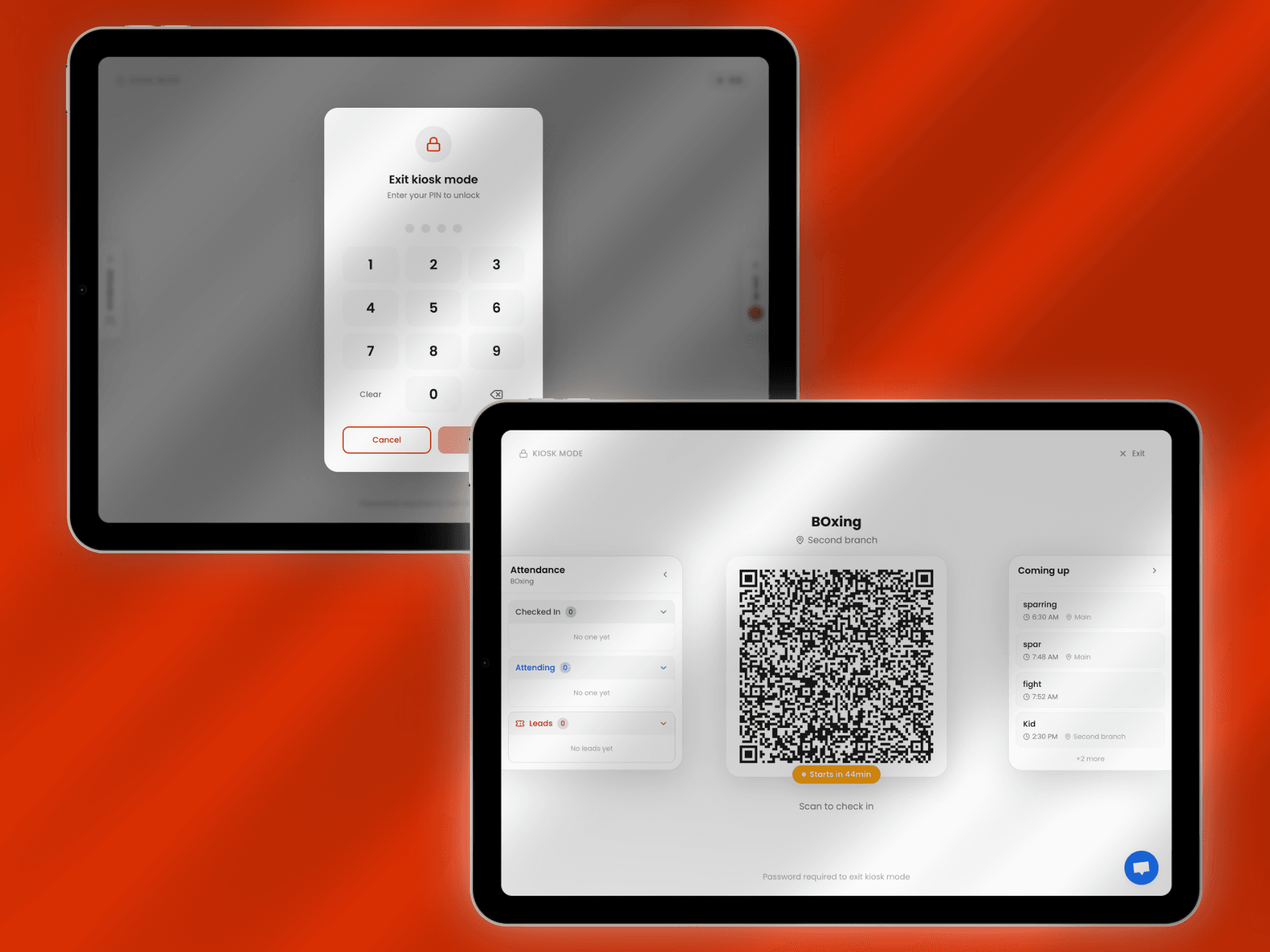
You're a coach, not an administrator. Yet every class starts the same way: you're mentally tracking who's arrived, trying to remember who checked in, keeping an eye on trial students, and somehow expected to start teaching on time while managing all this in your head.
Sound familiar?
In European martial arts gyms, we don't have the luxury of front desk staff like American gyms. The coach is responsible for everything, teaching, attendance tracking, managing members, and keeping the class running smoothly. This means valuable coaching time gets eaten up by administrative tasks that have nothing to do with teaching technique.
What if you could offload all that mental overhead? What if members checked themselves in automatically, you could see your entire class roster at a glance, and you never had to interrupt your coaching to manually track attendance?
That's exactly what modern tablet check-in systems do for coaches.
The Real Problem: Coaches Doing Admin Work Instead of Coaching
In most European martial arts gyms, the reality looks like this:
Before class starts:
Coach arrives early to set up
Members trickle in, coach tries to greet everyone while mentally noting who's there
Trial students need extra attention but might get lost in the shuffle
Coach is juggling equipment setup, warm-up planning, and attendance tracking simultaneously
During class:
Coach is teaching while trying to remember who showed up
If someone arrives late, coach has to note it mentally (or forget)
Trial members need tracking but coach is focused on technique instruction
After class:
Coach has to recall who attended from memory
Manually update attendance records later
Hope they didn't miss anyone
Follow up with trial members (if they remember who they were)
This isn't efficient. This isn't professional. And most importantly, this takes your focus away from what you're actually good at coaching.
What Is a Tablet Check-In System for Martial Arts Gyms?
A tablet check-in system is a self-service solution that eliminates manual attendance tracking entirely. Members check themselves in by scanning a QR code on a wall-mounted tablet. The system automatically records attendance, notifies you as the coach, and updates class rosters in real-time.
No more mental tracking. No more administrative interruptions. No more wondering who was actually in your class.
Key Components:
Wall-mounted tablet displaying dynamic QR codes
Class-specific QR codes that automatically rotate based on your schedule
Password-protected kiosk mode (coaches use 4-digit PIN to access settings)
Real-time attendance dashboard visible to coaches
Automatic class rosters showing participants and trial members
Lead tracking for prospective members
How QR Code Check-In Works
For Members:
Walk into the gym
Scan the QR code displayed on the tablet (takes their smartphone camera 5 seconds)
Confirm check-in
Head to the changing room or mat total time: 30 seconds
For Coaches:
Mount tablet once in your entrance area
Set up your class schedule once
The correct QR code automatically displays for each class
Open your phone/tablet and see exactly who's checked in
Start class knowing your full roster - no mental tracking needed
The tablet stays locked in secure kiosk mode with a 4-digit password only coaches know. Members can't exit the app or mess with settings.
7 Ways Tablet Check-In Transforms Your Coaching Experience
1. Your Brain Space Back
Stop using mental energy to track who's arrived. That cognitive load adds up, especially when teaching complex techniques. With automatic check-in, you can dedicate 100% of your attention to coaching quality, not attendance admin.
2. Know Your Class Before It Starts
Open your phone 5 minutes before class. See exactly:
Who's checked in already
Which members are trial students needing extra attention
Total class size for planning partner drills
Who's missing (for potential follow-up)
This pre-class awareness lets you plan better instruction.
3. Never Manually Track Attendance Again
No more clipboards. No more calling out names. No more trying to remember who showed up when you're updating records later that evening. The system timestamps every check-in automatically.
4. Professional Image for Trial Members
When prospective members visit, a sleek tablet check-in system shows you run a modern, organized gym. First impressions matter. This looks more professional than a coach juggling paperwork while trying to teach.
5. Automatic Lead Tracking
Trial members check in through the same system. You instantly see:
Who attended trial classes today
Which classes they tried
Their contact information for follow-up
How many times they've visited
No more scrambling to remember trial member names after class.
6. Focus on Late Arrivals Without Disruption
When someone arrives late, they check in via tablet. You see the notification on your phone. No need to interrupt your teaching to note their arrival you already know.
7. Stop Being the "Check-In Person"
You're a coach. You shouldn't spend the first 10 minutes of every class scanning members in or tracking arrivals. Let technology handle administration while you focus on teaching.
Dynamic QR Code Rotation: One Tablet, Multiple Classes
European gyms often run back-to-back classes throughout the day: Kids BJJ at 16:00, Adult Muay Thai at 18:00, Competition Training at 19:30. Each needs separate attendance tracking.
Dynamic QR rotation handles this automatically:
15:45 – Kids BJJ QR code appears on tablet 17:45 – System automatically switches to Adult Muay Thai QR 19:15 – Competition Training QR displays
If you run simultaneous classes (BJJ in one room, Boxing in another), the tablet can display multiple QR codes at once, each labeled with the class name.
Coaches never manually switch anything. The schedule runs itself.
Security That Lets You Relax
Coaches often worry: "What if members accidentally close the app or mess with the tablet?"
Modern systems prevent this:
4-Digit Password Protection
Only coaches and administrators can exit the check-in interface. Members cannot access device settings, close apps, or change anything. The tablet stays locked in kiosk mode.
Secure Mounting
Wall mounts or floor stands keep tablets accessible to members but protected from damage.
Real-World Implementation: What Coaches Experience
When Kombat Evolve implemented tablet check-in, the coaching experience changed immediately:
Week 1: Coaches helped members understand the QR scanning process. Most members figured it out after one demonstration. Check-in averaged 45 seconds.
Week 2: Members became comfortable. Coaches stopped needing to explain. Check-in dropped to 30 seconds. Coaches noticed they could focus on equipment setup instead of tracking arrivals.
Week 3+: Check-in became automatic. New members learned by watching regulars. Coaches started every class knowing exactly who was there without spending any mental energy on attendance.
The biggest surprise? Coaches didn't realize how much mental overhead attendance tracking created until it disappeared.
Addressing Coach Concerns
"I like greeting members personally won't this feel impersonal?"
Actually, it enhances personal connection. Instead of being distracted by attendance tracking, you can:
Greet members by name on the mat (not while scanning them in)
Focus your attention on teaching, not admin
Spend time helping trial members instead of tracking them
Build relationships during training, where it matters
The personal touch improves because you're not multitasking.
"How do I verify who's in my class if someone forgets to check in?"
Your coach dashboard shows check-ins in real-time. If someone's training but not checked in, you can manually add them through in 5 seconds. This happens occasionally during the first week, then becomes rare as members build the habit.
"Our gym runs multiple classes simultaneously how does this work?"
The tablet displays multiple QR codes at once, each clearly labeled:
"BJJ Fundamentals - Room 1"
"Boxing Technique - Room 2"
"Open Mat - Competition Area"
Members scan the code for their specific class. Each coach sees only their class roster.
Implementation Checklist for Coaches
Technology Setup:
[ ] Get a tablet (10"+ screen, iPad or Android)
[ ] Subscribe to gym management software with kiosk check-in
[ ] Mount tablet in entrance area (secure wall mount recommended)
[ ] Configure kiosk mode with 4-digit password
[ ] Test QR code scanning from different distances
Schedule Configuration:
[ ] Input complete class schedule
[ ] Assign QR code to each class
[ ] Set automatic rotation times
[ ] Configure buffer times (codes appear 15 minutes before class)
[ ] Test schedule transitions through a full day
Member Communication:
[ ] Send email explaining new check-in process
[ ] Post social media demonstration
[ ] Create simple signage near tablet: "Scan QR → Check In → Train"
[ ] Brief coaches on helping during transition
[ ] Address questions proactively
Coach Training:
[ ] Learn 4-digit password access
[ ] Practice viewing real-time attendance on phone
[ ] Learn how to manually add late check-ins
[ ] Understand lead tracking for trial members
Launch:
[ ] Start during slower period (Monday morning, not Saturday evening)
[ ] Help members during first week
[ ] Collect feedback from both members and coaches
[ ] Make adjustments based on real usage
[ ] Celebrate time saved and improved focus
Measuring Success from a Coach Perspective
Track these metrics after implementing tablet check-in:
Time saved before class: How many minutes you gain not tracking arrivals
Mental clarity: Subjective improvement in focus during teaching
Attendance accuracy: Compare digital records to your memory (usually reveals you were forgetting people)
Trial follow-up: Do you remember and contact trial members more reliably?
Member satisfaction: Are members happier with faster, smoother check-in?
Most coaches report 10-15 minutes saved per class in administration time—time redirected to teaching.
Is Tablet Check-In Right for Your Gym?
This system works exceptionally well for:
Small to mid-sized gyms (30-500 members) where coaches manage everything
Multi-discipline facilities running concurrent classes
Gyms with active trial programs needing lead tracking
Coach-owned gyms where the owner teaches and can't track admin simultaneously
Gyms prioritizing coaching quality over administrative tasks
It may not be necessary if:
Your gym has fewer than 20 members (minimal tracking burden)
You already have dedicated administrative staff (common in large UK/German chains)
You prefer complete manual control of all processes
For most European martial arts gyms where coaches handle everything, tablet check-in is transformative.
Getting Started with Kombat Evolve's System
At Kombat Evolve, we implemented tablet check-in specifically to free our coaches from administrative burden:
Dynamic QR codes automatically rotating with our schedule
4-digit password protection keeping the system secure
Real-time coach dashboards showing class rosters
Integrated trial member tracking for better follow-up
Zero interruption to coaching flow
Our coaches consistently report the same feedback: "I didn't realize how much mental space attendance tracking was taking until it disappeared."
Members check in within 30 seconds. Coaches start every class knowing exactly who's there. Everyone focuses on what matters training and teaching.
The result? Better coaching, more focused athletes, and a more professional gym operation.
If you're tired of juggling admin tasks while trying to coach, tablet check-in might be the operational change that transforms your teaching experience.
Ready to reclaim your coaching time and stop juggling attendance tracking? Tablet check-in systems let you focus on teaching while technology handles the admin work. Your members get a faster experience, you get peace of mind, and everyone benefits from more focused coaching.
Visit Kombat Evolve to see our tablet check-in system in action and learn how we're using technology to deliver better martial arts instruction.